

230 V wall-mounted remote control for Fresh & FreshLum CLAREO ADVANCE: Wireless control, built in and always within reach

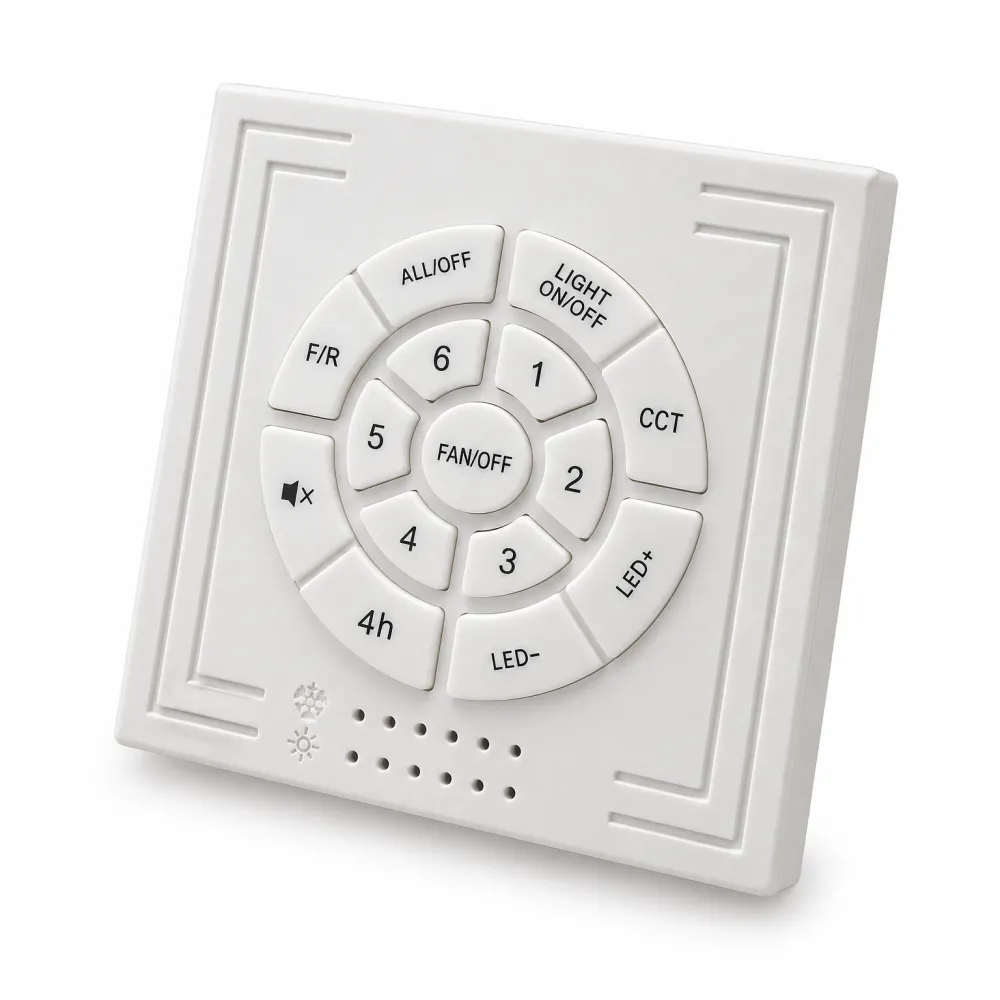
The 230 V wall-mounted remote control for Fresh and FreshLum CLAREO ADVANCE provides a convenient, unobtrusive fixed control point for fans installed in residential and commercial settings. It places an easily accessible control directly in the wall.

Powered by 230 V, it communicates with the fans by radio frequency (RF). It therefore requires no wiring between the wall-mounted control and the units, simplifying installation and allowing greater flexibility in fan placement.

Designed for flush mounting in a Ø67 mm electrical box, it fits easily into standard electrical installations. Its LED indicators show the selected speed, making it easy to monitor fan operation.

The wall-mounted control also has a 4-hour timer, particularly useful in temporarily occupied spaces or when operation needs to be time-limited. One remote control can operate up to 6 fans simultaneously. It is also possible to use two wall-mounted controls to operate the same group of 1 to 6 fans.

The wall-mounted remote control is compatible with Fresh and FreshLum CLAREO ADVANCE Ø130 cm fans. It is sold separately and is not included in the fan box.

Key features:

  • 230 V power supply
  • Radio-frequency communication with the fans
  • No wiring between the control and the units
  • Flush mounting in a Ø67 mm box
  • Compatible with Fresh and FreshLum CLAREO ADVANCE
  • LED speed indicators
  • 4-hour timer
  • Control up to 6 fans simultaneously

What’s in the box:

  • 1 230 V wall-mounted remote control for Fresh & FreshLum CLAREO ADVANCE
Ref: ACC.7206A1

230 V wall-mounted remote control for Fresh & FreshLum CLAREO ADVANCE

Currently out of stock
Available the week of 15/03/2027
Pricing is only available to customers who are logged into their account and whose access request has been validated.
To request access, go here

230 V wall-mounted remote control for Fresh & FreshLum CLAREO ADVANCE: Wireless control, built in and always within reach

The 230 V wall-mounted remote control for Fresh and FreshLum CLAREO ADVANCE provides a convenient, unobtrusive fixed control point for fans installed in residential and commercial settings. It places an easily accessible control directly in the wall.

Powered by 230 V, it communicates with the fans by radio frequency (RF). It therefore requires no wiring between the wall-mounted control and the units, simplifying installation and allowing greater flexibility in fan placement.

Designed for flush mounting in a Ø67 mm electrical box, it fits easily into standard electrical installations. Its LED indicators show the selected speed, making it easy to monitor fan operation.

The wall-mounted control also has a 4-hour timer, particularly useful in temporarily occupied spaces or when operation needs to be time-limited. One remote control can operate up to 6 fans simultaneously. It is also possible to use two wall-mounted controls to operate the same group of 1 to 6 fans.

The wall-mounted remote control is compatible with Fresh and FreshLum CLAREO ADVANCE Ø130 cm fans. It is sold separately and is not included in the fan box.

Key features:

  • 230 V power supply
  • Radio-frequency communication with the fans
  • No wiring between the control and the units
  • Flush mounting in a Ø67 mm box
  • Compatible with Fresh and FreshLum CLAREO ADVANCE
  • LED speed indicators
  • 4-hour timer
  • Control up to 6 fans simultaneously

What’s in the box:

  • 1 230 V wall-mounted remote control for Fresh & FreshLum CLAREO ADVANCE

General characteristics
Brand CLAREO
Range ADVANCE
Product family Accessories
Physical characteristics and dimensions
Height 20 mm
Width 85 mm
Length 85 mm
Net weight 0.1 kg

Log in to access downloadable documents
Technical data sheets, IES files, installation instructions, certificates... are only downloadable for customers whose access has been validated. To request access, go here

Log in to access the prescription
To access the prescription text, you must have an account and log in.